
Product · RMF Workspace
The system is the record. Everything hangs off it.
A CertiField system is an authorization boundary that owns its own RMF state — categorization, baseline, controls, evidence, assessments, architecture and monitoring — instead of a folder of documents that happen to describe the same thing.
- FIPS 199
- NIST SP 800-53 Rev 5
- Low · Moderate · High baselines
- Per-control workflow
- Ref
- P-11
- Kind
- Categorize
- Computed
- high-water mark
- Never
- auto-applied
Categorize once, and let the categorization mean something.
Record confidentiality, integrity and availability impact against FIPS 199, and CertiField computes the overall impact as the high-water mark and holds the rationale beside it. The system narratives an SSP needs — system description, authorization boundary, network architecture, data flow — live here as facts, not as paragraphs in a document nobody can query.
Categorization recommends a baseline. It never silently applies one. Changing the control set a system is being held to is a decision a person makes, and the record shows who made it.
- Confidentiality, integrity, availability captured separately with rationale
- Overall impact derived as the high-water mark, not typed in
- Baseline recommended, applied deliberately
- System narratives stored once and reused by every artifact
- Ref
- P-12
- Kind
- Select
- Catalog source
- NIST OSCAL
- Revision
- 800-53 Rev 5
Baselines from the NIST catalog, tailored to the system.
The 800-53 Rev 5 control catalog is seeded from the NIST OSCAL source, so control identifiers, titles, families and text match what your assessors and your AO are reading. Low, Moderate and High baselines define membership; applying one to a system creates the per-system control set your team then works.
Organization-defined parameter tokens are resolved in rendered control text rather than left as raw placeholders, so what a practitioner reads on the screen is what belongs in the document.
- Ref
- P-13
- Kind
- Implement
- Scope
- per system, per control
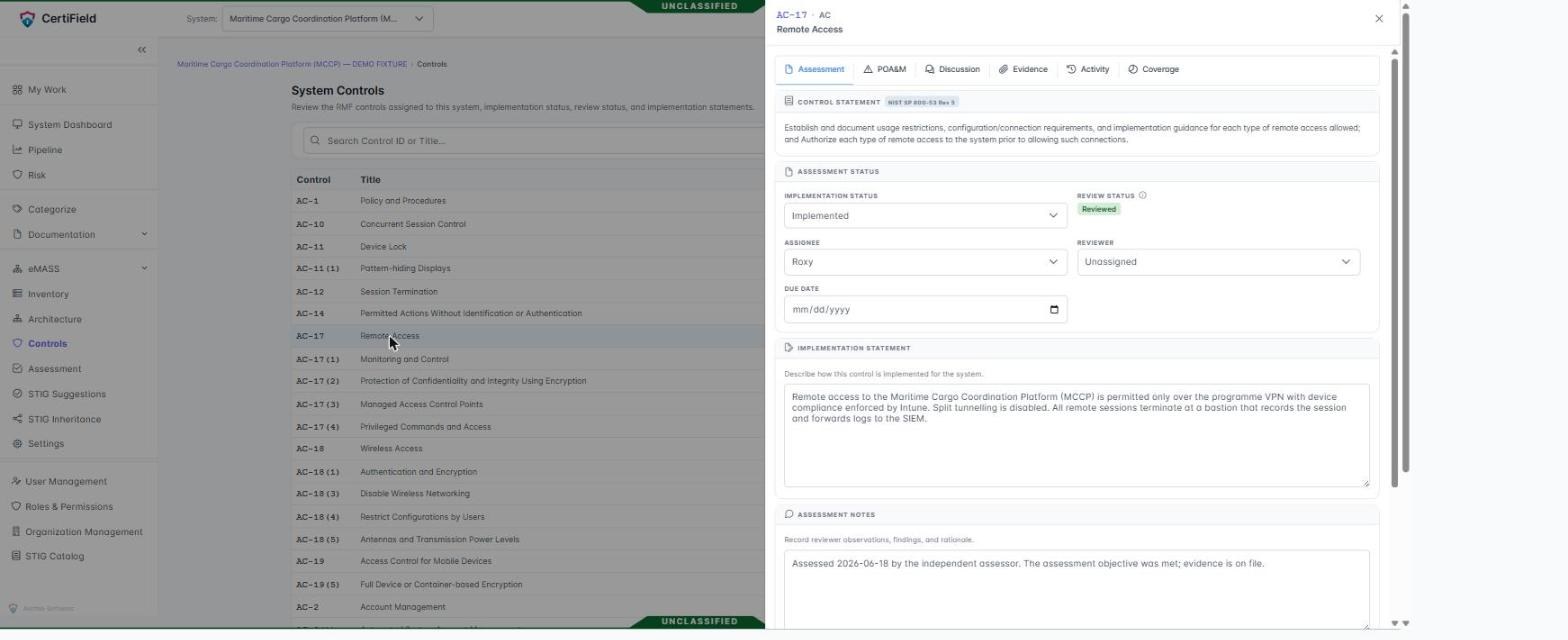
Per-control work, with the record of who did it.
Every tracked control carries the state an ISSO and an assessor each need, and they are different states.
| Field | What it holds | Who may change it |
|---|---|---|
| Implementation statement | How the control is satisfied for this system | Control implementation permission |
| Implementation status | Implemented, planned, not applicable, inherited | Control implementation permission |
| Assignment and due date | Who owns the control and by when | Control implementation permission |
| Assessment notes | The assessor's working record | Assessment permission |
| Reviewer | Who signs off the control | System management permission |
| Evidence and comments | Artifacts and discussion bound to the control | Evidence and comment permissions |
Those distinctions are enforced field by field, not screen by screen. An assessor recording a determination cannot quietly rewrite the implementation statement they are assessing, which is the separation the process assumes and most tooling leaves to good manners.
- Ref
- P-14
- Kind
- Access
- Permissions
- 77 keys, 12 groups
- Built-in roles
- 11 templates
Roles that match the way RMF teams are actually staffed.
System Owner, ISSO, ISSM, ISSE, Security Control Assessor, Cyber Engineer, Developer, Project Owner, Project Manager, Auditor and Organization Administrator ship as templates — and they are templates, not fixed definitions. An organization can rename them, narrow them, fork one, or build its own from the permission catalog.
Assignment happens where authority actually lives: a role can be held organization-wide, on a single system, or on a single project. A read-only assignment on one system stays read-only there even if the same person carries broader authority elsewhere.
- Stable permission keys so renaming a role never silently revokes access
- Sensitive permissions marked and flagged before they are granted
- Combined totals previewed when assigning several roles at once
- Every grant attributed to the person who made it
Next step